

You have a lounge that photographs well, a kitchen members like and desks that sit empty on a Friday. The enquiries that do come in ask what a day costs, you answer by email, and some of them never write back.
How do you sell coworking space from your website? Put the price where the person comparing can see it, sell the rooms to people who will never want a desk, and make the tour the easy next step. I will show each with Northline Works, a coworking website I designed for desks, studios and meeting rooms in East London.
Who buys coworking space, and what do they check?
Three kinds of buyer, each with a different first question.
- A freelancer who has had enough of the kitchen table. On Mumsnet, people who work from home list the same complaints: no company, family life getting in the way and being “easily distracted by house tasks”. They check what a day costs and when the doors open.
- A hybrid worker who comes into London part of the week and wants ten days a month without paying for thirty.
- A team lead who needs a room for eight on Thursday and has no interest in a desk.
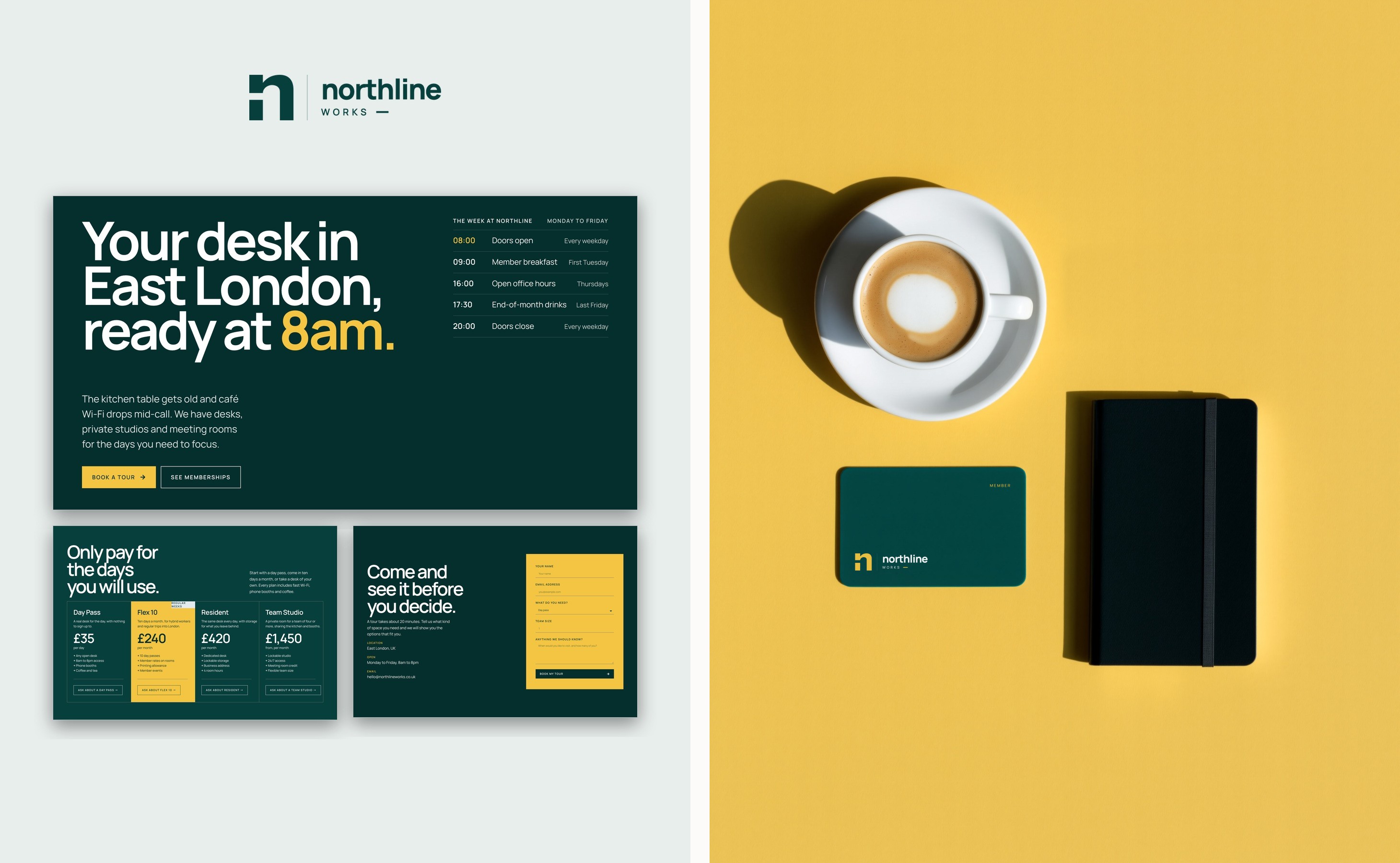
Northline’s first screen answers the first two before anybody scrolls. The headline says “Your desk in East London, ready at 8am.”, and the week at Northline sits beside it, from doors opening at 08:00 to closing at 20:00.
Should your rates be on the page before the tour?
Yes. A visitor comparing spaces is unlikely to fill in a form to learn a day rate when the next space shows its own. The software companies that sell to coworking operators give the same advice in their sales guides: clear plans and prices, photographs of the real space, and tours people can book themselves.
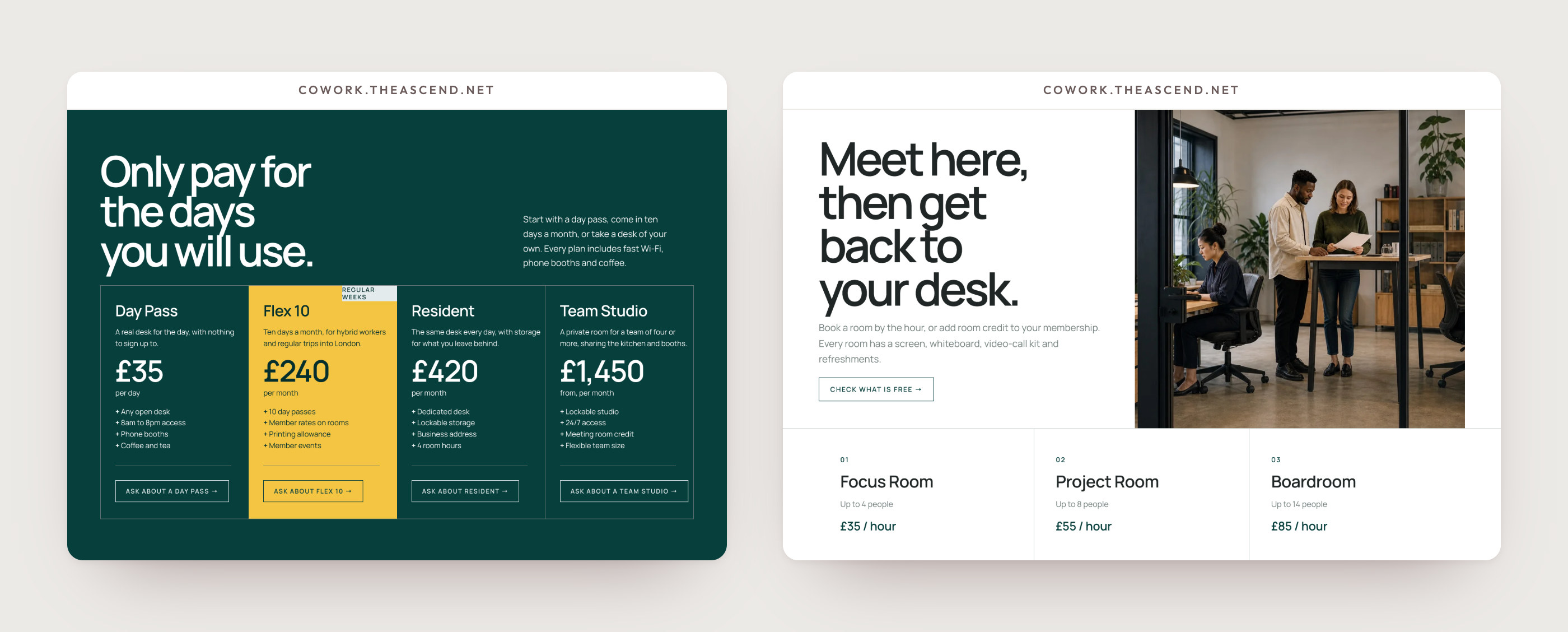
Northline puts the rate on each membership card: Day Pass £35, Flex 10 £240 a month, Resident £420 a month and Team Studio from £1,450 a month. The heading above them reads “Only pay for the days you will use.” Each card says who it suits, lists what is included and ends on its own button, such as “Ask about Flex 10”.
A rate on the card changes the tour too. The person who books it already knows what a Resident desk costs, so the twenty minutes go on the desk, the light and the kitchen. The wider case for publishing figures is in should you put prices on your website.
How do you sell rooms to people who never want a desk?
As an offer of their own. A team lead booking an afternoon should not have to read past every membership to find a room. On Northline the rooms have a section headed “Meet here, then get back to your desk.”, and each shows its size beside its hourly rate: the Focus Room for up to 4 people at £35 an hour, the Project Room for up to 8 at £55 and the Boardroom for up to 14 at £85. Every room lists the same kit, a screen, a whiteboard, video-call equipment and refreshments, with a link to check what is free.
Rooms also sell memberships. Flex 10 includes member rates on rooms and Resident includes four room hours, so the person who came for Thursday’s room sees what a membership would save them. On a phone, each room’s capacity stays beside its rate.
What should the tour form ask?
Enough to prepare the right tour, and no more. Northline’s form asks for a name, an email address, what the visitor needs, their team size and anything Northline should know. “What do you need?” is a list to pick from: day pass, flexible membership, dedicated desk, team studio, meeting room or not sure yet.
That single choice tells whoever gives the tour which desks and rooms to show first, and the page promises exactly that: “Tell us what kind of space you need and we will show you the options that fit you.” It also says how long the visit takes, about 20 minutes, so somebody on a lunch break knows they can fit it in. The button reads “Book my tour”, in the yellow the page keeps for actions.
After the tour, the website’s part is done. A short personal note the same day, naming the desk they liked, is the step no page can take for you.
How do you show the community without a sales pitch?
With the timetable and the members’ own notes. Coworking sites tend to sell a lifestyle and hide the numbers, and a visitor who wants a quiet desk reads “community” as noise. Northline shows its week as it runs: member breakfast on the first Tuesday at 9am, open office hours on Thursdays at 4pm and end-of-month drinks on the last Friday at 5.30pm. Every event is included and optional, and the heading over the members says so: “Say hello, or keep your headphones on.”
Each member note is signed with a first name, a job and a plan, such as “Product designer · Resident member” or “Climate consultant · Flex 10 member”, so a visitor finds somebody like themselves. The studio founder on a Team Studio speaks to the team lead; the Flex 10 member speaks to the hybrid worker.
Who keeps the rates and events up to date?
Your team, on the day a rate changes. A page that shows prices has to be easy to edit, or it ends up showing last year’s. Northline is built in Elementor, so the team changes rates and events in the editor without calling a developer. The page is set in Manrope with tabular figures, so £35, £240 and £420 line up in a column and a visitor compares them at a glance.
If the person who will update the site already works in Canva, that changes the platform question, and I compare the options in Canva, WordPress or HTML.
What a coworking website like Northline involves
Northline is a one-page website of 10 sections. The one-page launch covers 8 of them, built in 48 to 72 hours from $700, and the other two were added to the quote. A space with several locations, or studios that each need describing, suits the five-page website, from $1,350 over five booked working days. Photograph the lounge, the desks, a studio and your largest room in daylight before the build is booked. The Services page lists what each launch includes.
What coworking operators ask
Should a coworking space list its prices online?
Yes. Put each membership’s rate on its card and each meeting room’s hourly rate beside its capacity, so a visitor can compare spaces without calling.
Do I need online booking for meeting rooms?
A clear hourly rate and a link to check what is free let a team lead choose a room before asking. A full booking and payment system is separate software, built and tested on its own, and I quote it once I know what it has to do.
How do I get more coworking members from my website?
Show the price, sell rooms as their own offer, make the tour easy to book and follow up yourself after the visit. The website brings people to the tour; the tour and your follow-up sign them.
How many pages does a coworking website need?
A single workspace usually fits a one-page website of up to 8 sections. Several locations, or studios that each need their own description, suit five pages.
Can my team change rates and events after launch?
Yes. The site is set up in your name, and on Northline the team changes rates and events in the editor.